Wealth
TAKO
TAKO is the wealth component of the Kingdom of David. It is an Ethereum-based community token connected to the same symbolic dog that appears on the Vision page.
0x0ee375090f423934eBFBB241A3Eb2Ee4e01eAF0a
“Buy TAKO on Uniswap” opens Uniswap’s own site with the contract pre-selected. Always confirm the address above before you swap. This website never connects to your wallet.
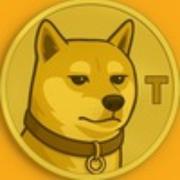
Same dog as on the Vision page
TAKO within the Kingdom of David
On the Vision page the dog standing beside the man is named TAKO. That same name and symbolic identity are carried into this wealth component. The cryptocurrency and the dog share a name and a visual link; they are not the same thing. Purchasing the token is not a guarantee of wealth.
Token information
Status labels follow the project blueprint. Verified = independently checked. Project-confirmed = confirmed by the project owner. Unconfirmed = current on-chain state not established here.
| Name / Symbol | Tako ($TAKO) Verified |
|---|---|
| Network | Ethereum Verified |
| Contract |
0x0ee375090f423934eBFBB241A3Eb2Ee4e01eAF0a
Verified
|
| Decimals | 9 Verified |
| Maximum supply | 420,690,000,000 Verified |
| Source code | Verified on Etherscan (Exact Match) Verified |
| Trading pair | Uniswap v2 TAKO/WETH0x0CFf36EE76F2Ea83064863B2EF19FE84d6f46417
Verified
|
| Liquidity | Reported as burned (not locked) Project-confirmed |
| Ownership | Reported as renounced Project-confirmed Not independently verified here |
| Taxes / limits | Defined in source code; current on-chain state Unconfirmed |
| Formal audit | None found on Etherscan Verified |
| Official website | takocoin.vip Project-confirmed |
| Telegram | Tako - Gateway Project-confirmed |
Live market data (price, liquidity, volume) can be viewed on DexScreener or Etherscan. Numbers change continuously and are not shown as fixed values on this page.
How to buy TAKO
A simple sequence. This website never asks for your seed phrase or connects to your wallet.
-
Get a wallet
Use a self-custody Ethereum wallet you control (for example MetaMask, Rainbow, or the Uniswap wallet).
-
Fund the wallet with ETH
You will need ETH on Ethereum mainnet to pay for the token and for network fees (gas).
-
Open the official Uniswap swap page
Use the “Buy TAKO on Uniswap” button on this page. It opens Uniswap with the correct contract already selected.
-
Confirm the contract address
Before swapping, compare the contract shown in Uniswap with the address displayed above. Counterfeit tokens with the same name exist.
-
Complete the swap inside Uniswap
Review the amount, slippage and gas fee, then confirm the transaction in your own wallet.
-
Add the token to your wallet if needed
If the balance does not appear automatically, import the token using the contract address on this page.